
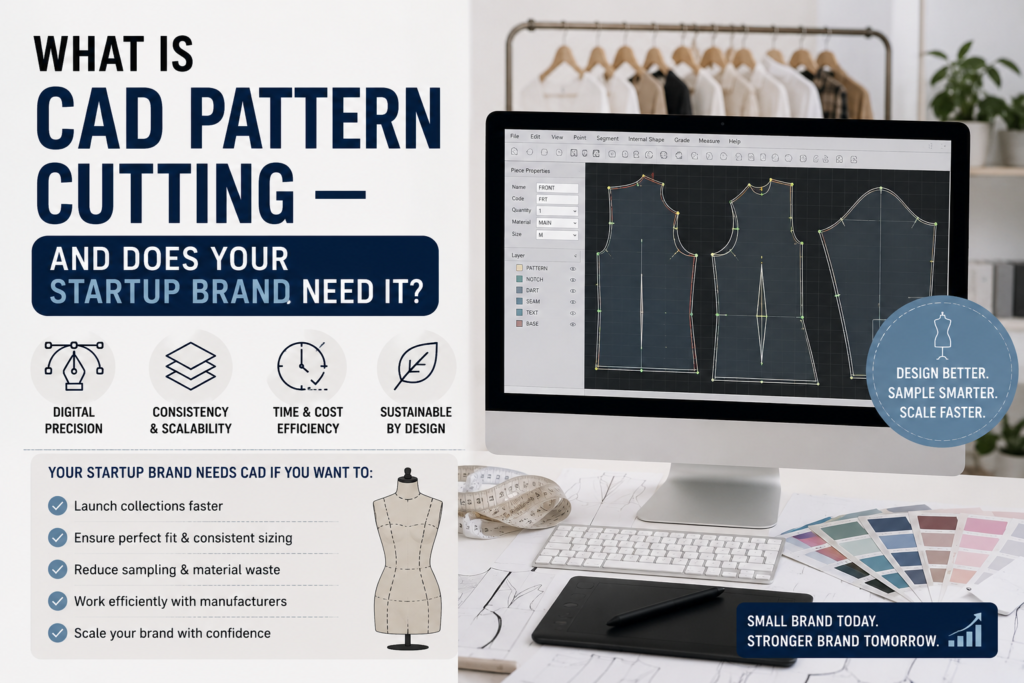
At some point in your first season of garment development, someone will mention CAD. Maybe your pattern cutter will offer it as an option. Maybe your factory will ask whether your patterns are available digitally. Maybe you will read about it in a forum for fashion founders and wonder whether you are already behind.
CAD — computer-aided design — is one of those terms that sounds more daunting than it needs to be. At its core, it simply means creating and managing your patterns digitally rather than by hand on paper. But the implications for your brand — in terms of costs, timelines, factory relationships, and long-term scalability — are worth understanding clearly before you are put on the spot.
This guide explains what CAD pattern cutting actually is, how it differs from manual pattern cutting, when it genuinely matters for a startup brand, and what file formats you need to know about before your patterns go anywhere near a factory.
First — a reminder of what pattern cutting involves
If you are new to garment development, it helps to have the context in place. What is pattern cutting is covered in full in the first post in this series. The short version: pattern cutting is the process of turning a design into a set of precise flat templates that allow a garment to be cut from fabric and assembled consistently. CAD is simply one of the tools used to create and manage those templates.
Before CAD, all patterns were created by hand — drafted on paper, transferred to card, stored physically in rolls or flat files. Many excellent pattern cutters still work this way, and for many garments and many studios, manual pattern cutting remains entirely appropriate. CAD does not replace the skill of what a pattern cutter does — it changes the tools they use to do it.
What is CAD pattern cutting?
CAD pattern cutting is the use of specialist software to create, manipulate, store, and share garment patterns digitally. Instead of drafting on paper and storing physical pattern pieces, the pattern cutter works on screen — drawing, adjusting, grading, and nesting patterns within a software environment designed specifically for garment production.
The most widely used CAD systems in the UK and international garment industry include Gerber AccuMark, Lectra Modaris, Optitex, and Browzwear. These are professional, industry-grade tools — not general design software like Adobe Illustrator or AutoCAD. They are built around the specific needs of garment pattern work: precise measurement input, seam allowance management, grading rules, and marker making (the process of arranging pattern pieces on fabric for efficient cutting).
The output is a set of digital pattern files that can be stored, duplicated, versioned, and shared electronically — with another studio, with a factory in the UK, or with a manufacturer anywhere in the world.
CAD vs manual pattern cutting — what is actually different?
The underlying principles are identical. Whether a pattern cutter drafts on paper or on screen, they are doing the same work: interpreting a design, creating precise pieces, balancing the pattern, and preparing it for production. The methods covered in our guide to flat pattern cutting vs draping both apply whether the final output is paper or digital.
What changes with CAD is the workflow and the output format.
What CAD does differently from manual pattern cutting
Storage and retrieval. A digital pattern file takes up no physical space, cannot be damaged, lost, or worn through repeated use, and can be retrieved instantly from anywhere. A paper pattern is a physical object that can deteriorate over time, be stored incorrectly, or simply be misplaced.
Modifications. Adjusting a digital pattern is faster and cleaner than recutting paper pieces. If a seam needs to move 3mm, the change is applied precisely on screen and every related measurement updates accordingly. On paper, the same correction requires physical marking, cutting, taping, and re-checking.
Grading. Once grading rules are established in a CAD system, scaling a base pattern into a full size range is significantly faster than manual grading. The software applies the rules consistently to every piece. For brands with wide size ranges — six sizes or more — the time saving is meaningful.
Marker making. CAD software can optimize the layout of pattern pieces on a length of fabric (called a marker) to minimise fabric waste. This is particularly valuable in high-volume production, where even a small improvement in fabric utilisation across thousands of garments adds up to significant cost savings.
File sharing. A digital pattern file can be emailed, shared via cloud storage, or transmitted directly to a factory’s cutting machine — instantly, anywhere in the world. A paper pattern has to be physically shipped, which takes time and money and introduces the risk of damage or loss.
What CAD does not change
CAD does not make a poorly drafted pattern better. The software is a tool — it executes what the pattern cutter inputs. If the proportions are wrong, the ease is incorrect, or the seam shaping is poorly judged, CAD produces a precisely incorrect digital pattern rather than an imprecisely incorrect paper one.
The skill is still in the hands — and the judgement — of the pattern cutter. CAD amplifies good pattern cutting; it does not compensate for weak pattern cutting.
What file formats do factories use?
This is the practical question that matters most when you are preparing to hand your patterns to a manufacturer. Different factories use different systems, and it is worth confirming what format yours requires before your patterns are finalised.
The most common digital pattern file formats in garment production are:
DXF (Drawing Exchange Format)
DXF is the most widely accepted format for exchanging pattern files between different CAD systems and between studios and factories. It is an open format, which means it can be read by many different software programmes — not just the one it was created in.
If a factory asks for your patterns digitally, DXF is almost always the format they mean. Most UK factories, and the majority of overseas manufacturers, can work with DXF files.
AAMA/ASTM
AAMA (American Apparel Manufacturers Association) and ASTM (American Society for Testing and Materials) are standardised formats developed specifically for the garment industry. They carry more detailed garment-specific information than a basic DXF — grain lines, notches, seam allowances, and piece labels are all encoded within the file.
For factories using industry-standard CAD systems like Gerber or Lectra, AAMA/ASTM files are often preferred over basic DXF because they transfer more information reliably.
PDF patterns are useful for smaller-scale production, printing at scale on a plotter, or for reference purposes — but they are not always directly usable by computerised cutting machines. Some factories accept PDF for manual cutting; others require a vector-based format like DXF.
PLT (Plotter files)
PLT files are specifically formatted for printing patterns at full scale on a plotter — a large-format printer that outputs pattern pieces at 1:1 size on paper. If a factory does its cutting manually from printed paper patterns rather than from computerised cutters, they may request PLT files.
What to do before you confirm your factory
Before your patterns are finalised, ask your factory directly:
- Do you accept digital pattern files?
- Which format do you prefer — DXF, AAMA, PDF?
- Do your cutting machines accept digital files directly, or do you print and cut manually?
- If we send manual paper patterns, how would you like them presented?
These questions take five minutes and save the frustration of discovering a format mismatch when you are already on a tight timeline.
Does your startup brand need CAD patterns?
This is the question most founders actually want answered. And the honest answer is: it depends on where you are in your development journey and how you plan to manufacture.
Here is a practical framework for thinking it through.
You almost certainly need CAD patterns if:
You are manufacturing overseas — particularly in Asia. Factories in countries like China, Vietnam, Portugal, and Turkey increasingly work with computerised cutting equipment that requires digital pattern files. Sending physical paper patterns overseas is slow, expensive, and introduces the risk of damage or misinterpretation. CAD files can be sent instantly and used directly.
You have a wide size range. If your brand offers six or more sizes — or plans to in the near future — digital grading is significantly faster and more accurate than manual grading. The investment in CAD at the pattern stage pays back quickly in grading efficiency.
You are planning larger production volumes. At higher volumes, computerised fabric cutting becomes cost-effective and factories increasingly expect digital-ready patterns. A brand producing 500 units per style has different needs from one producing 50.
You want to store and reuse patterns reliably over multiple seasons. Digital pattern files are infinitely more reliable to archive than physical paper patterns, which fade, tear, and take up space. If you plan to repeat styles or develop from the same block season after season, digital storage is the sensible long-term approach.
You may not need CAD patterns yet if:
You are in early development and still refining the design. When you are at toile stage — still finding the fit, still making significant corrections — working in digital adds no meaningful advantage. The pattern cutter will be making changes frequently, and the format of the pattern matters less than the quality of the thinking behind it.
You are manufacturing with a UK sample room that works with manual patterns. Many excellent UK studios and sample rooms work primarily with paper patterns and produce outstanding results. If your factory can work from physical patterns and your volumes are small, there is no compelling reason to force a digital workflow.
You are producing very small runs with close factory relationships. If you are manufacturing ten or twenty units of a style with a local factory you work with closely, the logistics of paper patterns are manageable and the cost of CAD conversion may not be justified.
The practical middle ground
Many startup brands begin with manual patterns for their first one or two seasons — while they are finding their fit, refining their range, and establishing factory relationships — and then move to digital patterns as they scale. This is a completely sensible approach.
What matters is that when you make the move to digital, you do so cleanly: with patterns that have been properly converted (not just scanned), in the right format for your factory, with all markings correctly encoded.
CAD and grading — why they work well together
One of the strongest practical arguments for CAD patterns is how well they support grading. As covered in this series, grading is the process of scaling an approved base pattern into a full size range.
Manual grading requires the grader to work through every pattern piece individually, applying incremental measurements by hand. For a simple style with four or five pieces, this is manageable. For a structured jacket with thirty pieces graded across eight sizes, it is time-consuming, expensive, and introduces more opportunity for human error.
In CAD, once the grading rules are established, the software applies them to every piece simultaneously. The result is faster, more consistent, and more easily verified. For brands planning to offer more than four or five sizes, the efficiency argument alone can justify the move to digital.
CAD and 3D visualisation — worth knowing about
One area where CAD technology has advanced significantly in recent years is 3D visualisation. Software like CLO3D and Browzwear allows pattern pieces to be assembled virtually on a digital avatar — producing a realistic simulation of how the finished garment will look and fit before any physical sample is made.
For some brands — particularly those with complex designs, unusual fabrics, or overseas manufacturers where communication is difficult — 3D visualisation can reduce sampling rounds and improve factory communication.
It is not yet a replacement for physical sampling and fitting. The simulations are impressive but imperfect, and the fit of a real garment on a real body still requires physical confirmation. But as a communication tool, particularly for visual-heavy design discussions with factories, it has genuine value.
If this is something you are interested in, it is worth asking any studio you work with whether they have 3D capability — not all do, but its availability is increasing.
What to ask your pattern cutter about CAD
When you begin working with a new development studio, a few straightforward questions will clarify where they stand on digital pattern working:
“Do you offer CAD patterns as part of your service?” Not all studios do. Some work exclusively manually; others are fully digital; many offer both.
“Which CAD software do you use?” This matters because different systems produce slightly different file formats. Gerber, Lectra, Optitex, and others each have their own native formats, though all can export to the standard formats factories accept.
“Can you supply patterns in DXF or AAMA format?” These are the two formats worth confirming, as they are what the majority of factories worldwide work with.
“If we start with manual patterns, can you convert them to digital later?” This is a common requirement and most professional studios can accommodate it — but it is worth confirming.
“Will I receive copies of all digital files?” Your pattern files are your intellectual property. Make sure you understand upfront that you will receive and own the files, not just the studio.
At A Pattern Cutter, we work with both manual and digital patterns and can supply DXF and AAMA files for factory use. If you are unsure what your factory needs, we can help you find out — and make sure your patterns are in the right format before handover.
Frequently Asked Questions
Do I need to buy CAD software myself? No. You do not need to own or operate CAD software as a brand. You simply need a development studio that uses it and can supply your patterns in the right digital format. The software licences are expensive and the learning curve is significant — this is a tool for professional pattern cutters, not something brands typically need in-house.
Is a scanned paper pattern the same as a CAD pattern? No. Scanning a paper pattern produces an image file — it captures what the pattern looks like, but it does not contain the digital data that CAD systems and factory cutting machines work with. A proper CAD pattern is drafted or converted within specialist software, with all measurements, grain lines, notches, and seam allowances encoded as data. If your factory asks for a CAD file, a scan is not sufficient.
Can manual patterns be converted to CAD? Yes. Most professional studios can digitise paper patterns — tracing them into CAD software and encoding all the relevant markings. This is sometimes called pattern digitising. It adds cost and time compared to working digitally from the start, but it is a well-established service and a practical option for brands that began development manually and want to transition to digital.
Will CAD patterns make my samples come back better? Not directly. CAD improves consistency, speed, and factory communication — but a well-fitting pattern drafted manually is still better than a poorly-fitting pattern created in CAD. The quality of your patterns depends on the skill of your pattern cutter, not the tools they use.
My factory is in the UK — do I still need digital patterns? Not necessarily. Many UK factories work perfectly well with manual paper patterns, particularly for small-run production. That said, digital patterns make communication easier, storage more reliable, and future scaling simpler. It is worth asking your factory directly what they prefer.
This post is part of the Pattern Cutting 101 series from A Pattern Cutter — a pattern cutting, grading, toiling, and sampling studio based in North London, working with fashion startups and growing brands. View our services →|Read the full blog series →